Your messages are full of deadlines you never wrote down.
Mycelium reads your Messages and any email you connect, picks out the things with a date on them — a plan, a deadline, a bill — and lists them for you. You approve or dismiss each one. Nothing goes on your calendar unless you say so.
Before you download: Mycelium will ask for Full Disk Access. It’s the only way macOS lets an app read your Messages; there is no smaller permission for it. What it reads stays on your Mac. How to turn it on

It reads your messages. Here is exactly what that means.
Any app that touches your Messages owes you a straight answer about where they go. Mycelium’s answer: they stay on your Mac. The details are here, not buried in a policy.
Your messages stay on your Mac
Mycelium reads them from the Messages history already on your Mac, and keeps what it finds there too. No account, no ads, no analytics. The part that decides what to show you runs on your Mac as well.
No server that can read your data
Mycelium only goes online for these, and all but the first are off until you choose them:
- Checking for a new version, once a day. It sends nothing about you.
- Email or Telegram accounts you connect. Your Mac talks to Google or Telegram directly.
- A Canvas calendar link, if you paste one in, to read assignment due dates.
- Phone access, if you switch it on. An encrypted copy of your list waits in a mailbox on this site. Only your Mac and your phone hold the key, so the mailbox can’t read it.
You choose what it reads
Nothing is connected until you connect it, one account at a time. Disconnecting cancels the access at Google, not just inside the app. You can narrow it to the people who matter and leave group chats out.
Nothing is added for you
Approving an item records your choice and stops. Putting it on your calendar is a separate press. An app that reads your messages shouldn’t also be deciding your week.
Mycelium is free and MIT licensed. The full details, including how phone access is encrypted, are on the privacy page.
From a message to your calendar, with you in between
- It reads your messages On your Mac, from the Messages history already there. Nothing is uploaded.
- It spots what is being asked A plan, a deadline, a payment, a change of time — and whether the conversation around it looks like a real plan coming together.
- It works out the date “Thursday” means the Thursday after the message was sent, not after you opened the app.
- You approve or dismiss One key each. What you dismiss teaches it what to stop showing you.
- It becomes a task Named after the person, with the conversation attached.
- You put it on your calendar Only if you say so. Nothing is added for you.
Four steps, once
- 01
Download and unzip
Double-click Mycelium.zip in your Downloads folder. You get Mycelium.app.
- 02
Move it to Applications
Drag Mycelium into your Applications folder, then open it.
- 03
Press Open Anyway
The first time, macOS says it can’t check the app. Open System Settings › Privacy & Security, scroll down, and press Open Anyway. Only once.
- 04
Turn on Full Disk Access
In System Settings › Privacy & Security › Full Disk Access, switch on Mycelium. Mycelium opens that page for you.
Why Full Disk Access, and why by hand
Your Messages history is a file macOS keeps private. Unlike Photos or Contacts, there is no pop-up that asks for it: the only way in is the Full Disk Access switch, which you turn on yourself in System Settings › Privacy & Security › Full Disk Access. Mycelium uses it to read Messages and nothing else.
The Open Anyway step is there because Apple charges developers for a certificate that skips that warning. You only see it the first time.
Built for hands that stay on the keys
A list you can only click through is a list you stop opening. After you approve one, it moves straight to the next item instead of jumping back to the top.
Mycelium on its own, or with add-ons
Out of the box, Mycelium is your calendar and the list of things it found for you to approve. Nothing else loads. Add-ons come in the same download and stay off until you turn one on from Add-ons in the tabs along the top. Each gets its own tab. Turn one off and it’s gone, not hidden, and what it saved is kept for when you turn it back on.
Acorn · Scholarships
Scholarship deadlines broken into steps, essay drafts you approve before they’re used, and a Chrome extension that fills in application forms. You always press submit yourself.
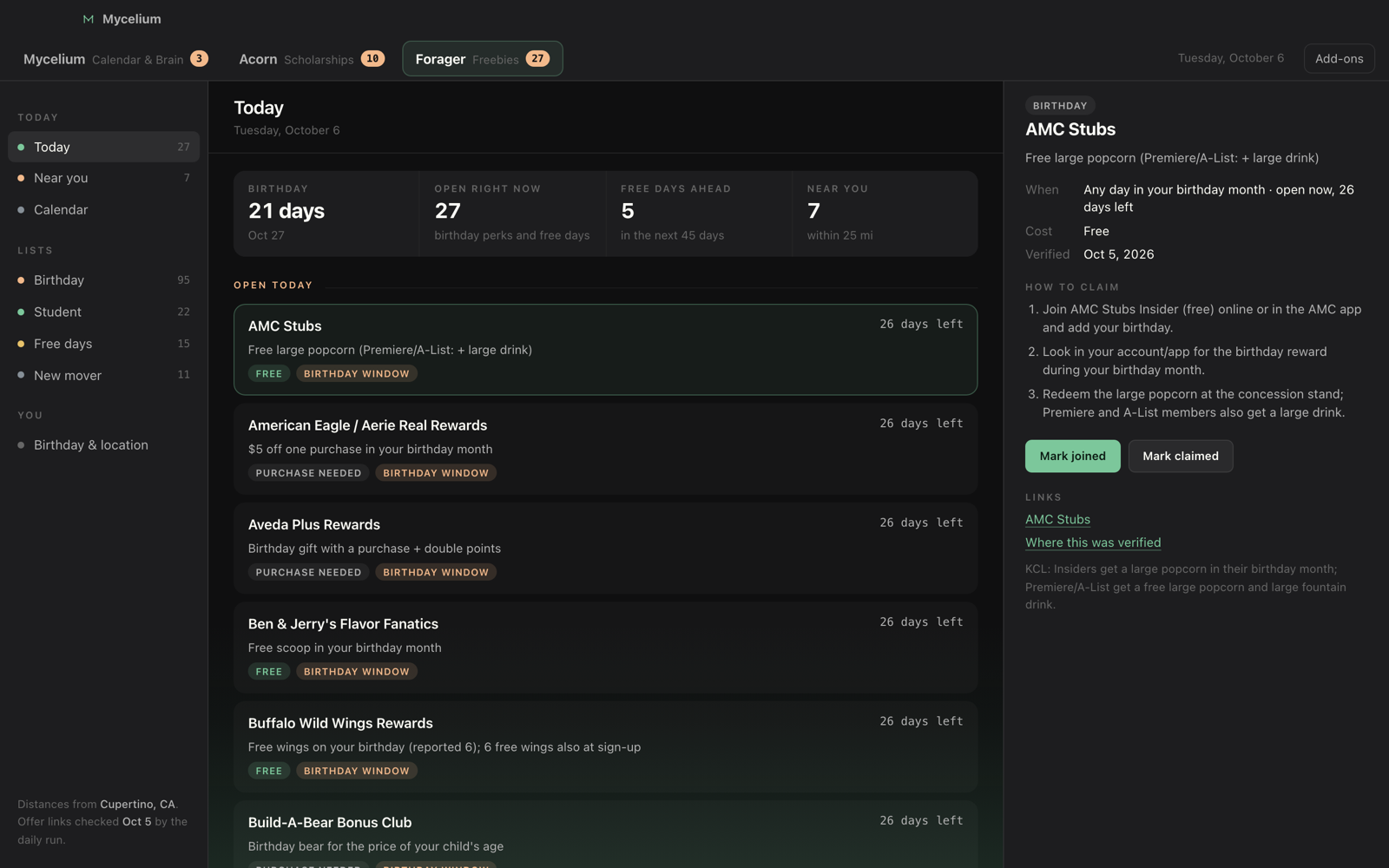
Forager · Freebies
Birthday rewards and sign-up perks near you, planned around when each one can actually be claimed.
Lichen
A small strip at the edge of your screen that shows your Claude usage and the sessions you have running. It can show what’s waiting in Mycelium too.
How it decides what to show you
Every message goes through a few checks, all on your Mac and none of them online. The diagram uses the names the app uses inside:
Every check gets a say
No single test throws a message out. One that asks nothing outright, in a thread where two people are trading times, still gets through.
It reads the conversation
Not just the one message. A question you already answered, or a plan someone moved an hour later, is settled — and treated that way.
It says why
Every item carries its own reasons. What it learns from your dismissals can back those reasons up, but never overrule them on its own, and never quietly.
The things I missed were never written down anywhere.
Not the big ones. An invoice due Monday, a friend asking about Thursday, a date named in passing halfway up a thread. Every one of them was stated perfectly clearly by someone — just not anywhere I would look again. Writing them down means stopping the conversation to retype what the other person already said.
Everything I found that solved this wanted the messages instead: upload the thread, connect the account, trust the server. For a calendar convenience that is an absurd trade, and I did not want to make it — so Mycelium doesn’t. Your history stays where it already is.
The approval step is the part I care most about. Software that reads your messages and then quietly writes to your calendar has decided something for you twice over. Mycelium shows you a list and stops. What happens next is yours.
— Bryant